


 We are here to help:
Finding a mentor or a mentee is easy on the MentorCity platform. We’ve created this quick step-by-step guide to walk you through the process.
1) Conduct a search based on the criteria that are important to you, such as specialized skills/development areas, industries, job functions, languages and/or meeting cities.
Tip: Select only one or two criteria when starting your search and then refine your search by adding other necessary criteria as you go along.
Note: In some mentoring programs the administrator will match you with a mentor/mentee. If this is the case, please skip to step number 5.
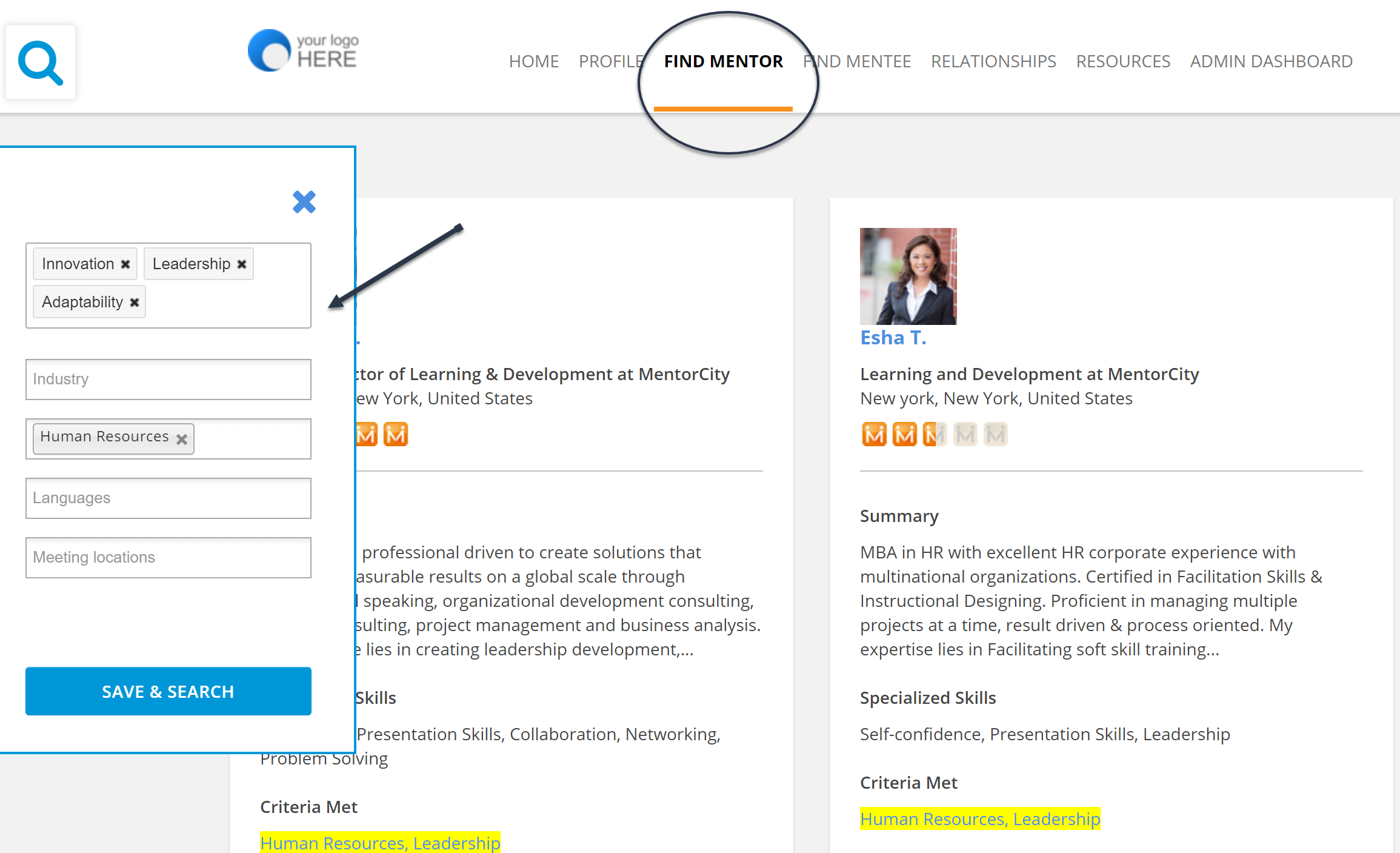
2) Review the mentor or mentee profiles that return from your search criteria to determine which one would be a good fit.
Tip: Look at the symbol at the top right corner of each profile. It indicates your compatibility with the other person based on the strengths you list in your profile.
3) Invite your selected mentor or mentee to an initial meeting by sending a message explaining why you would like to establish a mentoring relationship with them and then wait for a response.
Tip: For ideas on what to say in your invitation, read 3 ways to get your mentor to say “Yes” to a meeting.
4) If you have received an email notification from a potential mentor or mentee, click on the link to view the invitation, review the invitation as well as the person’s profile and then accept or decline the invitation.
Tip: If you don’t believe the other person is a good mentoring fit, read How to say ‘no’ to a mentoring request.
5) Once your mentoring relationship is established, schedule meetings by syncing your calendars or by using the ‘Send Message’ section on the MentorCity platform.
Tip: The mentoring relationship page can also be used throughout your mentoring relationship to: complete a mentoring agreement outlining the expectations of the relationship, post agendas, set goals, ask/respond to questions in-between meetings, record time spent, upload files, have in-person meetings or video and audio calls through Skype, take notes, review content on how to have successful mentoring relationships, and fill in a program evaluation at the end of the mentoring relationship detailing how you benefited from the relationship.

—
Trouver un mentor ou un mentoré dans MentorCity
1) Trouver un mentor ou un mentoré est facile grâce à la plate-forme MentorCity. Nous avons créé ce guide étape par étape rapide pour vous aider à franchir les étapes du processus.
Effectuez une recherche en vous basant sur les critères qui importent pour vous, comme les compétences spécialisées ou les secteurs de perfectionnement, les industries, les fonctions professionnelles, les langues ou les villes de réunion.
Suggestion : Ne sélectionnez qu’un ou deux critères lorsque vous commencez votre recherche, puis précisez-la en ajoutant d’autres critères nécessaires en cours de route.
2) Examinez les profils des mentors ou des mentorés générés par vos critères de recherche pour déterminer lequel vous conviendrait.
Suggestion : Regardez le symbole dans le coin supérieur droit de chaque profil. Il indique votre compatibilité avec l’autre personne d’après les points forts que vous énumérez dans votre profil.
3) Invitez votre mentor ou mentoré désigné à une rencontre initiale en envoyant un message expliquant pourquoi vous voudriez établir une relation de mentorat avec lui ou elle et attendez sa réponse.
Suggestion : Pour des idées sur le contenu de votre invitation, lisez 3 façons de convaincre un mentor de dire « Oui » à une rencontre.
4) Si vous avez reçu une invitation, examinez l’invitation et le profil de la personne, puis acceptez ou refusez l’invitation.
Suggestion : Si vous ne pensez pas que l’autre personne soit la bonne pour cette relation de mentorat, lisez Comment dire « non » à une demande de mentorat.
5) Une fois votre relation de mentorat établie, organisez des rencontres en synchronisant vos calendriers ou en utilisant la section « Envoyer le message » sur la plate-forme MentorCity.
Suggestion : La page consacrée aux relations de mentorat peut aussi être utilisée tout au long de votre relation de mentorat pour conclure une entente de mentorat décrivant les attentes de la relation; publier les ordres du jour; fixer des objectifs; poser des questions ou y répondre entre les rencontres; consigner le temps consacré aux rencontres; télécharger des fichiers; organiser des rencontres en personne ou des vidéoconférences/audioconférences avec Skype; prendre des notes; examiner le contenu sur la façon d’établir des relations de mentorat fructueuses; et remplir une évaluation du programme, à la fin de la relation de mentorat, pour indiquer comment vous avez tiré parti de la relation.
Media: Media Download